Toggle Side Panel
Cyclr Community
  • Forums
  • Tutorials
  • Documentation
        • User Documentation >>
          • Introduction to Cyclr
          • API Guides
          • How to use Connectors
          • Navigating the Cyclr ConsoleLearn all about your Cyclr Console and configuration
          • Embedding Cyclr in your SaaS
          • Scripting
        • View More...
        • Connector Guides >>
          • Salesforce
          • Microsoft
          • GitHub
          • HubSpot
          • Oracle NetSuite
          • Stripe
        • View More...
  • Resources
    • New Features
    • Cypher
    • DevOps Services
    • Changelog
    • Support Portal
    • Referral Program
    • Blog
    • News Archive
More options
    Sign in
    Cyclr Logo
    Cyclr Logo
    • Forums
    • Tutorials
    • Documentation
          • User Documentation >>
            • Introduction to Cyclr
            • API Guides
            • How to use Connectors
            • Navigating the Cyclr ConsoleLearn all about your Cyclr Console and configuration
            • Embedding Cyclr in your SaaS
            • Scripting
          • View More...
          • Connector Guides >>
            • Salesforce
            • Microsoft
            • GitHub
            • HubSpot
            • Oracle NetSuite
            • Stripe
          • View More...
    • Resources
      • New Features
      • Cypher
      • DevOps Services
      • Changelog
      • Support Portal
      • Referral Program
      • Blog
      • News Archive
    Close search
    Home » User Documentation » Templates » Template versioning

    About Cyclr

    6
    • Introduction to Cyclr
    • Minimum requirements
    • Glossary
    • Errors
    • IP Allow List
    • Legal notices

    Cyclr Console

    14
    • Partner Console Dashboard
    • The Builder
    • Reports
    • Console Configuration
    • General Settings
    • Notifications
    • Embedding Customization
    • Security settings
    • Data retention settings
    • Custom Service Domains
    • Handle transaction errors
    • Payload Size Limitations
    • Performance tips
    • GitHub Integration

    Connectors

    36
    • Introduction to Connectors
    • Connector Installation Overview
    • Connector Settings
    • Handling Connector Releases
    • Connectivity Comparison
    • Connector Guides
    • Application Connectors
      • Introduction to Application Connectors
    • Utility Connectors
      • Introduction to Utility Connectors
      • Counter Storage
      • Cross Updating Preventer
      • Data Tools
      • Entity Cross Ref Storage
      • Generic File
      • Generic File Downloader
      • Generic Form
      • Generic Webhook
      • Data Storage
        • Introduction to Data Storage
        • Global Data Storage
        • Global Object Storage
        • Cycle Data Storage
        • Cycle Object Storage
    • Custom Connectors
      • Introduction to Custom Connectors
      • Methods
      • Triggers
      • Last Successful Run Date
      • Parameters
      • Scripting
      • Data Types
      • Paging
      • Custom Objects
      • Dynamic Custom Fields
      • Automatically Install Webhooks
      • Connector Standards
      • Settings
      • Custom Connector Authentication
      • Rate Limits

    Templates

    17
    • Introduction to Templates
    • Template Settings
    • Create a Template
    • Tools
    • Connectivity Tools
    • Field Mappings
    • Add Custom Fields
    • Custom Object Method Categories
    • Test Scripts
    • Collection splitting
    • Pass data between two steps
    • Test a template
    • Template versioning
    • Introduction to Cycles
    • Stop a cycle
    • Copy Cycles as Templates
    • Import or Export Templates

    Accounts

    5
    • Introduction to Accounts
    • Account Users
    • Sub Accounts
    • Connector Authentication Link
    • Export or Import Cycles

    Embedding

    17
    • Introduction to Embedding
    • ORBIT
    • Installing a Partner Connector
    • Embed Cyclr in an iFrame
    • LAUNCH
      • Introduction to LAUNCH
      • User Experience
      • Customize Appearance
      • Build Compatible Templates
      • Handle LAUNCH callbacks
      • Deploy LAUNCH
    • Marketplace
      • Introduction to Marketplace
      • Set up a Marketplace
      • Styling Marketplace
      • Deploying a Marketplace
      • Marketplace Callback
      • Marketplace Webhook Callback
      • Marketplace Settings

    API

    19
    • Introduction to the Cyclr API
    • Authentication
    • Authorize Account API calls
    • Install Connectors into an Account
    • Install a Cycle from a Template
    • Step Setup
    • Activate a Cycle
    • Install Connectors
    • Create an Account
    • API Example Walkthrough
    • Connector Authentication
      • Introduction to Connector Authentication
      • API Key Authentication
      • HTTP Basic Authentication
      • OAuth Authentication
    • Data on Demand
      • Introduction to Data on Demand
      • Get Account Connectors
      • Get Connector Methods
      • Call a Connector Method
      • IP Restriction

    Deep Data Ingestion

    3
    • Vector Databases Introduction
    • Preparing and Ingesting Data into Vector Databases
    • Querying & Retrieving Data from Vector Databases

    Real-Time Actions

    6
    • Generic Webhook
    • Introduction to Data on Demand
    • Get Account Connectors
    • Get Connector Methods
    • Call a Connector Method
    • IP Restriction

    Release Notes

    33
    • Introduction to Release Notes
    • 2025
      • 2025-11
      • 2025-10
      • 2025-09
      • 2025-08
      • 2025-07
      • 2025-06
      • 2025-05
      • 2025-04
      • 2025-03
      • 2025-02
      • 2025-01
    • 2024
      • 2024-12
      • 2024-11
      • 2024-10
      • 2024-09
      • 2024-08
      • 2024-07
      • 2024-06
      • 2024-05
      • 2024-04
      • 2024-03
      • 2024-02
      • 2024-01
    • 2023
      • 2023-12
      • 2023-11
      • 2023-10
      • 2023-06
      • 2023-05
      • 2023-04
    • Archive
      • Archive
      • 2022
      • 2021
    View Categories
    • Home
    • Documentation
    • Templates
    • Template versioning

    Template versioning

    4 min read

    To help you and your team organize and iterate your integrations, Cyclr provides Template versioning.

    This allows you to create Draft “releases” of a Template so you can build it out and test new additions, before locking it as a Live release.

    While Live releases cannot be edited, you can copy them to create an iterative new release. Once this has been built out as required, it can be set as the new Live version of the Template.

    Combining this with our audit trail features, your whole team are able to build and work on integration templates, with their user details being assigned to a release for traceability.

    Template Releases Orientation #

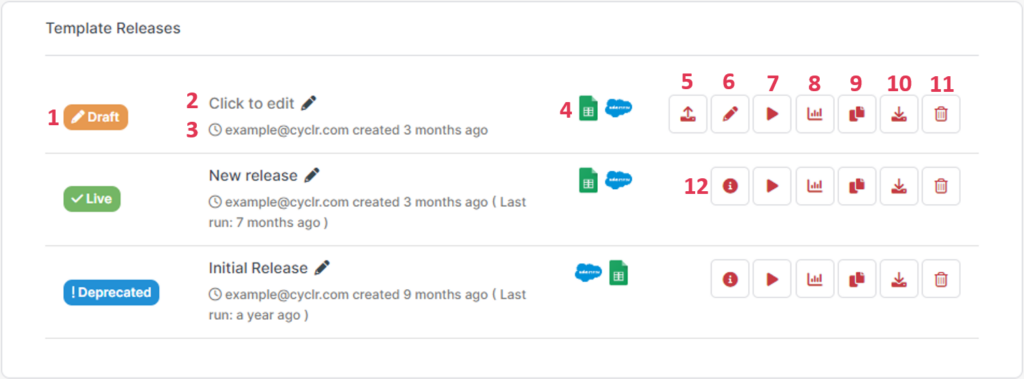
    Screenshot showing Template Releases and the options available:
    Reference:

    1. Status of the template release
    2. Release notes for template release (click on text to add/edit)
    3. Audit trail (see who created the release and when)
    4. The icons of the Connectors used within the template release
    5. Promote Draft release to Live
    6. Edit template release in the workflow builder
    7. Run or Pause the template release
    8. View template release Report
    9. Copy template release – allows you to choose whether to create a new Draft within the existing Template, copy it out into another Template, or copy it out to create a completely new Template.
    10. Export and download the release as a JSON file
    11. Delete template release
    12. View template release in the workflow builder (Live and Deprecated releases are readonly)

    Published Templates #

    One of the main advantages of using the versioning feature is for updating your published Templates without having to take them down.

    Published templates will always provide the Live version to your users when they choose to install one so you are able to create a Draft version, make any necessary updates and promote to Live to make it accessible to new user installations – without any downtime.

    Template Publishing Options #

    In the Template Builder, click the Publish button along the top and you’ll see the following popup:
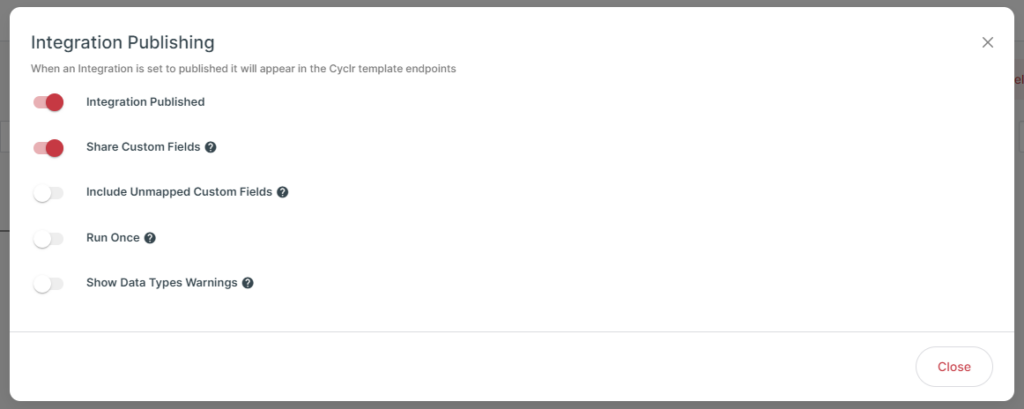
    The options in the popup allow you to configure what happens when your Template is installed:

    OptionDescription
    Integration PublishedEnable this to allow the Template to be installed through any of the following:in an Account when clicking the “Templates” button.through LAUNCH.through Marketplaces.When disabled, the Template won’t be available to install.
    Share Custom FieldsEnable this to include any Custom Fields your Template has mapped when it’s installed into an Account.When disabled, Cyclr won’t copy any Custom Fields into the Account when installing the Template.
    Include Unmapped Custom FieldsAvailable only when Share Custom Fields is enabled.Enable this to have Cyclr copy all Custom Fields in the Connector Methods your Template uses, whether those Custom Fields have been mapped in the Template or not.
    Run OnceEnable this to have Cycles created by installing this Template through Cyclr’s LAUNCH and Marketplaces to execute only once then stop.
    Show Data Types WarningsEnable this to display warnings to the end-user when installing the Template through LAUNCH or Marketplaces if they map fields that result in a mismatch of data types, e.g. Integer to DateTime.

    Copying Templates #

    As a Live Template Release is automatically locked for editing, you can quickly create a new identical, editable version by copying it.

    Clicking the Copy Release button next to a Release allows you to select where you want the new release to be copied to.

    The default destination is the current Template, however, you are also able to:

    • create a new Template from your Release.
    • copy your Release into another existing Template.
    • create a new Template in another Cyclr Console if you have access to more than one.

    This allows you to quickly create new releases for similar integrations, e.g if you are creating CRM integrations with your application and have created one, you can copy it to a new template, and swap out the CRM steps for the equivalent steps of another CRM connector.

    Promoting Releases #

    Once you have promoted your release, the previous Live release will be marked as Deprecated and locked for editing.

    This allows you to keep a trail of your integration development progress so you can see what you we previously doing, while also being able to go back by creating a copy of a Deprecated release and promoting it to Live.

    What are your Feelings

    • Happy
    • Normal
    • Sad

    Share This Article :

    • Facebook
    • X
    • LinkedIn
    • Pinterest
    Test a templateIntroduction to Cycles
    Page Contents
    • Template Releases Orientation
    • Published Templates
      • Template Publishing Options
    • Copying Templates
    • Promoting Releases

    Company

    • Company
    • About Us
    • Security and Compliance
    • Pricing
    • Blog
    • Branding
    • Embedded iPaaS
    • Release Notes

    Legal

    • Website Terms
    • Privacy Policy
    • Terms and Conditions
    • Data Protection Agreement
    • SLA
    • GDPR

    UK Office

    +44 (0) 3300 102 525

    US Office

    +1 (646) 585-2525

    Cyclr Logo

    White labelled API integration framework for creating & managing in-app SaaS integrations.

    © 2025 Cyclr. All rights reserved.